

Challenges of Data Migration
Data migrations are rarely simple. Whether you’re consolidating systems, modernizing infrastructure, or moving to the cloud, the migration process can introduce risk, complexity, and disruption. Underestimating the challenges of data migrations leads to frustration and delays.
At Bluesource, we’ve spent more than two decades managing large-volume migrations across legacy systems, archives, networks, and cloud platforms. We’ve identified five of the most common challenges organizations face with data migrations. But don’t worry, we also know how to solve them.
1. Compatibility Issues
The Challenge
We’ve all tried to open a document only to encounter a “file not compatible” error. Now scale that with multiple terabytes worth of data. During migrations, organizations often face a language barrier between systems, including:
- Inconsistent data formats
- Legacy systems lacking modern export options
- Proprietary archive or backup tools
- Hidden dependencies between applications
These incompatibilities can slow down a migration project, with time spent fixing and reworking files.
Bluesource’s Solution
We have decades of experience with complex, cross‑platform migrations, especially those involving legacy archives. Our experts:
- Accurately and with detail map data formats across old and new systems
- Use proven tools and proprietary methods to extract and restructure data
- Ensure the destination environment is configured for seamless ingestion
The Result
Full compatibility with minimal workflow disruption.
2. Risk of Data Loss
The Challenge
Data can be lost during transfer, transformation, or ingestion if the migration isn’t meticulously orchestrated. For regulated industries, data loss can mean noncompliance and potential fines or legal issues.
Bluesource’s Solution
The standard accepted failure rate for data migrations is around 4%. We don’t agree with that. Our team adheres to the principle of “if at first you don’t succeed, try again” and is committed to rectifying any fixable failures. Our validated, defensible migration process that includes:
- Pre-migration data integrity checks
- Full chain‑of‑custody tracking
- Validation and reconciliation at every stage
- Providing full details of reconciliation efforts for any errors
- Utilizing manual data pulls
The Result
Data arriving complete, intact, and defensible, with full documentation.
3. Downtime and Business Disruption
The Challenge
Even a short downtime can lead to major business disruptions. Large migration projects can slow systems, pause workflows, and cause mailboxes to be inaccessible.
Bluesource’s Solution
Minimize disruptions and limit impact on day-to-day business during a migration with:
- ArchiveMASH TM, our software built for speed and efficiency
- Phased migration strategies and batching users
- Throttled transfers scheduled around business needs
- Parallel systems that maintain user access
- Real‑time monitoring to anticipate bottlenecks
- Team members based across time zones for increased flexibility with the migration schedule
The Result
Migration work happens quickly and quietly in the background, so businesses can keep running without disruption. End users might not even notice anything going on.
4. Data Security and Compliance
The Challenge
Moving large volumes of sensitive data increases the risk of:
- Unauthorized access
- Misconfigured permissions
- Compliance violations
- Exposure during transit
- Improper retention or deletion
In regulated industries such as government, healthcare, and finance, security is even more critical.
Bluesource’s Solution
Bluesource is ISO/IEC 27001:2017 certified globally under migration services. Every step of our migration process incorporates security and compliance. We provide:
- Encrypted transfer channels
- Compliance-aware data mapping aligned to GDPR, HIPAA, FINRA, SEC, and more
- Full audit trails and defensible documentation
- Post‑migration policy and retention configuration
The Result
Migrations meet regulatory requirements, and data remains secure.
5. Data Quality and Accuracy
The Challenge
Poor data quality delays projects, breaks integrations, and leads to unreliable reporting. Migrating bad or unnecessary data to a new system wastes time and effort. Bad data includes:
- Duplicates
- Files with Inconsistent naming conventions
- Corrupted or incomplete records
- Orphaned files or inactive user data
Bluesource’s Solution
The start of any migration process includes a thorough data assessment to identify poor data, remove duplicates and obsolete information, and ensure the migration starts with clean and standardized information.
The Result
The migration destination contains only quality data, saving storage space and improving system efficiency.
Following Best Practices
Navigate the complexities of large-scale data migrations by combining Bluesource’s proven migration process and our takeaways on best practices for data migration from the Gartner® report on best practices.
Gartner® categorizes their best practices for data migration into four phases: planning, design, development, and delivery. These phases coordinate with the Bluesource migration process: scoping, setup, reconciliation, and delivery.
| Migration Process Phase | Best Practices | |
|---|---|---|
| Scoping | Your environment is accurately sized | Start with a comprehensive analysis and audit of the source data. Scoping is more than just sizing the environment; it includes detailed mapping with all data fields, formats, and relationships. |
| Setup | Software is installed; Test Migration Performed | Organize migrations in phases, starting with a test pilot. As Gartner® explains, “Limited testing increases the chance of unforeseen issues, while troubleshooting becomes difficult.” |
| Reconciliation | Chain of Custody Provided; Validation | Recommendations from Gartner® include using automated testing and validation to minimize migration errors. Garter® explains that “It is easy to sidestep testing and validation sometimes due to the significant human effort required to follow through with this practice.” |
| Production | Data is continuously moved until complete | System Performance should be continuously monitored until a migration is complete. As Gartner® points out, “Without continuous monitoring, organizations face the risk of corrupted data, extended downtimes, and compliance violations, as issues may go unnoticed until they escalate.” |
Discover the Gartner® 15 Best Practices for Successful Data Migration
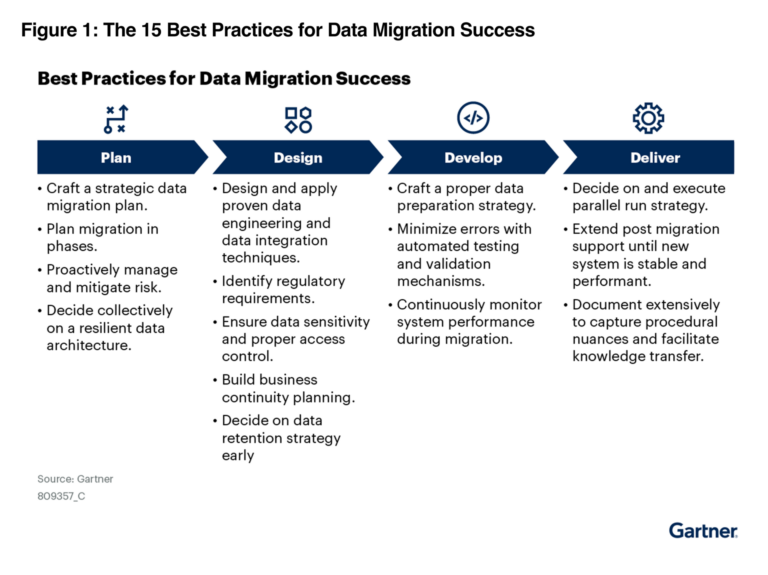
Gartner, 15 Best Practices for Successful Data Migration, By Masud Miraz, Henry Cook, Melody Chien, 7 April 2025. Gartner is a trademark of Gartner, Inc. and/or its affiliates.
This graphic was published by Gartner, Inc. as part of a larger research document and should be evaluated in the context of the entire document. The Gartner document is available upon request from Bluesource.