

Journaling vs. Mailbox Archiving: Why the Difference Matters More Than You Think
Key Takeaways
- Journaling vs. Mailbox Archiving: journaling captures an unalterable copy of every email in transit for compliance and eDiscovery; archiving manages individual mailbox storage space.
- Defensibility Risks: Mailbox archiving leaves critical gaps in legal defensibility because users can delete archived messages, risking data spoliation during litigation.
- Migration Opportunities: Organizations using Enterprise Vault strictly for email journaling can reduce costs and streamline management by migrating to Microsoft 365.
The terms “journaling” and “mailbox archiving” are sometimes used interchangeably, but they’re not the same thing. They both fall under the general “data management” umbrella, but function differently, and each serves a unique purpose. Confusing them can leave a serious gap in your legal defensibility.
How Email Journaling Works
Journaling captures a copy of every message sent or received with no exceptions. Journaling routes messages into a commingled repository, typically via SMTP. End users generally have no access to this repository at all.
How Mailbox Archiving Works
Mailbox archiving works differently. It archives messages within each user’s individual mailbox based on a defined strategy, such as by age, size, or both. Archiving often replaces the original item with a stub: a smaller shortcut created by stripping the attachment and truncating the message.
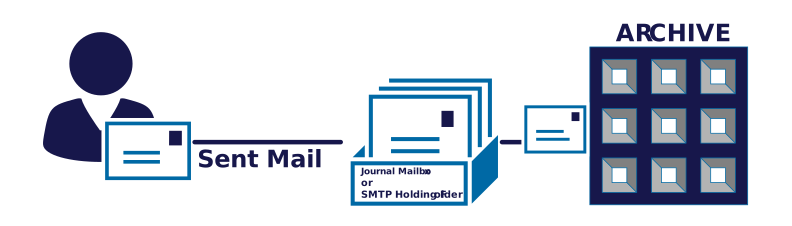
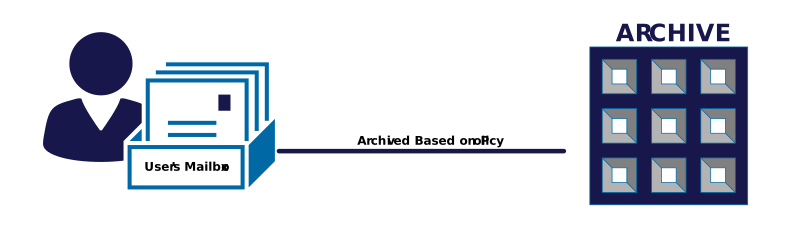
User Access with Journaling and Email Archiving
With journaling, access is tightly controlled and typically limited to compliance staff or the applications performing eDiscovery searches.
With mailbox archiving, each user has access to their own archive, and, depending on configuration, may be able to delete items from it. That distinction becomes critical the moment litigation or an audit is on the table. User-controlled deletion can create gaps in a data retention policy.
Comapare Journaling vs. Mailbox Archiving
Journaling
Mailbox Archiving
How it Works
Keeps a copy of every message, sent or received, in a commingled repository. Method of capture is typically SMTP, but journal mailboxes were used in the past. End users typically have no access.
Archives messages in individual mailboxes according to a strategy (by age, size, or both), and can replace it with a smaller shortcut, usually by stripping the attachment and truncating the message.
Access Control
Access is usually limited to staff or applications performing eDiscovery searches.
Each user has access to their own archive and may be allowed to delete items depending on configuration.
eDiscovery Value
High – Journal emails typically contain envelope information such as BCC recipients and expanded distribution groups. Since users do not have direct access, spoilage is only tied to retention/expiry, or inadvertent data loss.
Low – Mailbox archive data is not captured at time of transit, so messages can be deleted or saved outside the mailbox before they are archived. If end users can delete from their archives, critical messages may not be preserved.
Purpose
Compliance, eDiscovery, and Records Management
Keeping on-premises mailbox sizes in check
Replacing Journaling with a Compliant Archive
Journaling is one tactic for data management. Email journaling helps maintain compliance, security, and defensibility. While Enterprise Vault includes email journaling tools, if journaling is the only thing you’re using EV for, moving to a different email archive can lower overall costs and streamline your data management.
Keep Enterprise Vault
- You archive mixed sources: file shares, SharePoint on-prem, Bloomberg, IM, or legacy Notes/Domino, etc.
- You have deep, custom retention and legal hold workflows built around Enterprise Vault’s policies.
- Regulatory or data-residency rules keep archived mail out of Microsoft’s cloud entirely.
- You’re mid-contract and the migration hasn’t been budgeted yet.
Move to Microsoft 365
- Exchange/email is the bulk of what’s archived, and everyone’s mailbox already lives in Exchange Online.
- You want eDiscovery, retention, and Communication Compliance in one admin surface instead of two.
- You’re paying to keep Enterprise Vault infrastructure alive mainly out of inertia.
- Copilot and other M365 tools need to search across live and archived content together.
Moving Enterprise Vault Journaling to Microsoft 365
Active Archiving is Disabled
Exchange Mailboxes Moved
EV Archive Migration Starts
Shortcuts Converted
Explore Your Migration Options